


Updated on 15.09.2026 – This article describes the state of version 6.7.7. The original version of 04.05.2026 referred to version 2.0.4.
In May, we fundamentally overhauled our FAQ Professional plugin: statistics dashboard, rating system, integration with the shop search and machine-readable markup according to schema.org. Since then, seven further versions have been released. This article describes what the plugin does today – and how you can set it up in just a few steps.
Key facts at a glance
Current version: 6.7.7 for Shopware 6.7 (in the Store since 02.09.2026), 6.6 line for Shopware 6.6
Requirements: Shopware 6.6 or 6.7, PHP 8.2 to 8.5. Elasticsearch or OpenSearch are used if available – but they are not mandatory
Target audience: Shopware shops that want to manage and analyse questions and answers centrally
Existing customers: Update notes at the end of the article
Setup in five minutes – the video
If you would rather watch than read: the tutorial shows the complete process, from the tag to the analysis in the dashboard.
From relaunch to the current version
In many shops, FAQ sections are created once and rarely maintained – because nobody can see whether they are being read. That is exactly what the relaunch in May changed: since version 2.0, the plugin shows in the backend which questions are opened and how the answers are rated.
With the switch to the 6.6 / 6.7 versioning scheme in August, the first two digits indicate the Shopware line a version is intended for. Since then, the following have been added: an editor for answers with images, videos and notice boxes, readable links to individual questions, assignment to categories and products without a tag, a toggle for all sales channels, output on category pages without a CMS block and an FAQ accordion compliant with WCAG 2.2.
Assignment: by tag, category or product
You group your questions into FAQ groups. There are two ways to assign a group to the pages of your shop.
Via a tag. You attach a tag to products, categories, product variants, landing pages or shipping methods; the FAQ group appears wherever the tag is attached. Shipping methods, landing pages and variants can only be reached this way.
Directly in the group. Since version 6.7.6, you can also select categories and products directly in the FAQ group, without any tag. One filled-in field is sufficient; both methods can be combined.
In both cases: the assignment is not inherited. An assigned category reaches its category page – not the products in it and not the subcategories. If these should also show FAQs, they need their own entry.
A toggle enables a group or an individual question for all sales channels, including channels you create later. If you switch it off again, your previous selection continues to apply unchanged.
Display in the shop
You define where an FAQ group appears on the group itself:
- On the product page as a separate tab. The position in the tab bar is configurable.
- On category pages below the content – even if the layout does not contain an FAQ block. If a block is present, it takes precedence; questions do not appear twice.
- In Shopping Experiences as a full-width CMS block or as an FAQ element in a single column. Landing pages are served exclusively this way.
- In the checkout linked to the selected shipping method, for example for current delivery notices.
The same question is output only once per page, even if it is in two groups. In the Shopping Experiences editor, a preview based on a sample product or sample category shows which groups and questions will actually appear later.
FAQs in the shop search
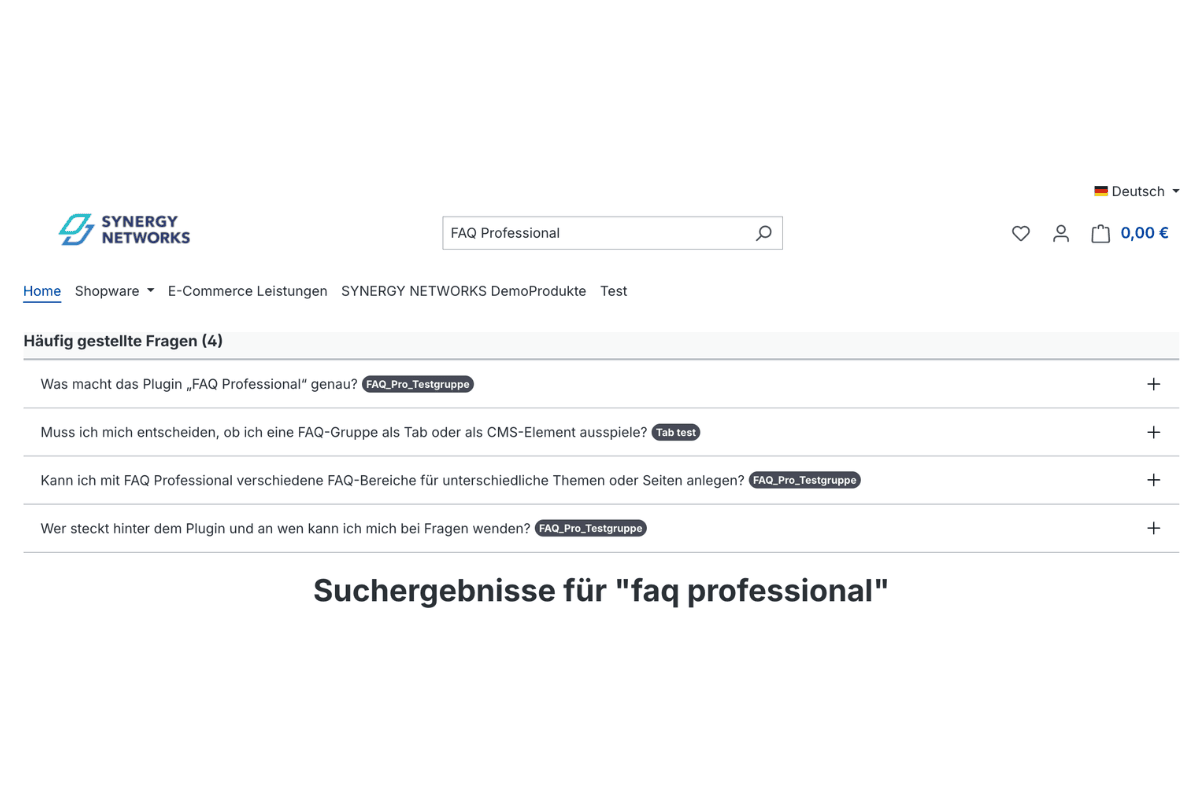
Matching questions already appear in the search suggestions and on the search results page, grouped together. The position is selectable: above, below or next to the products. If you maintain a dedicated FAQ page, the results link there and open the relevant question.
If Elasticsearch or OpenSearch is in use, the plugin uses the existing instance. Without it, the search runs via the database; with large inventories it is then somewhat slower.
Analysis instead of guesswork
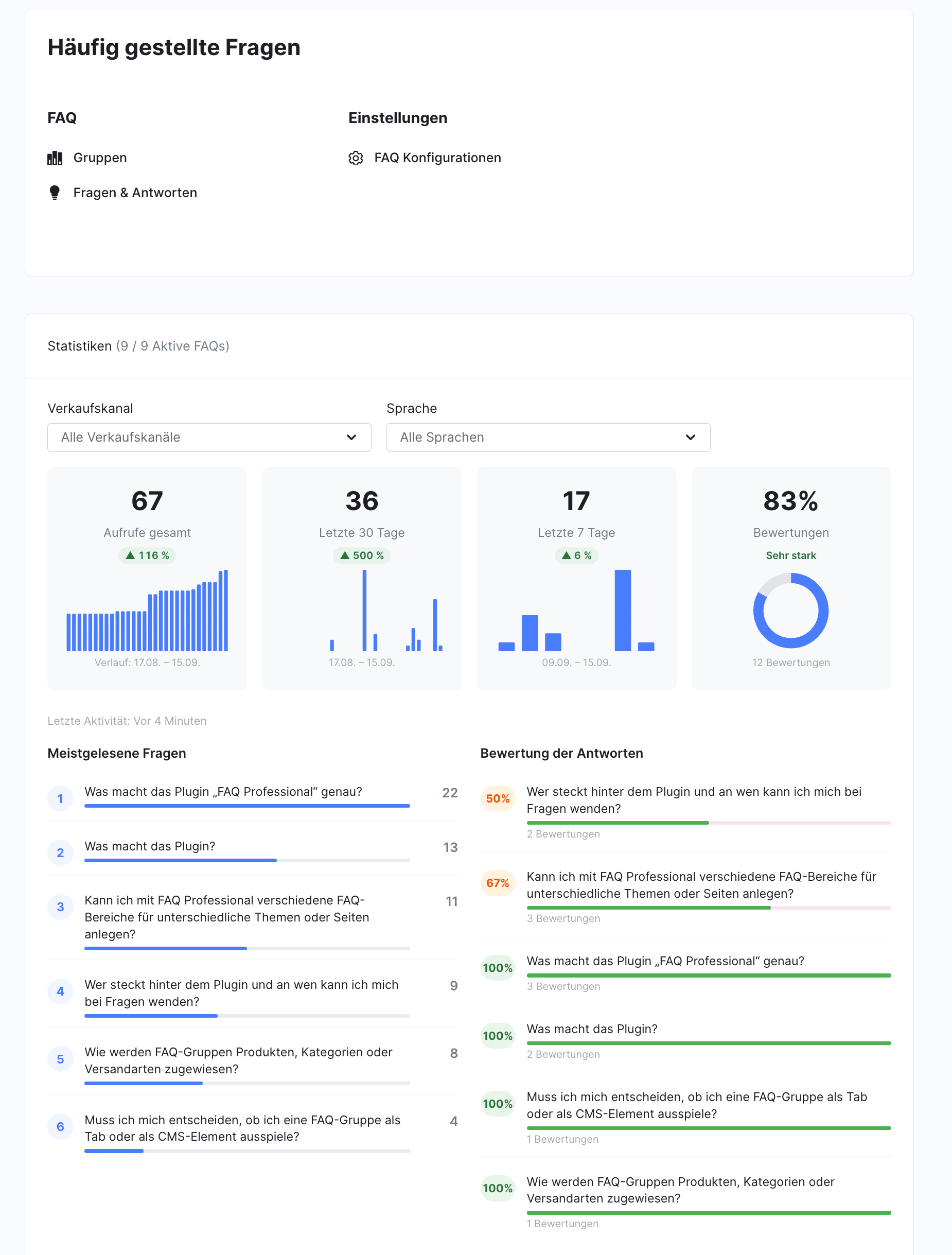
The dashboard in the backend shows which questions are read: four key metrics with trends over the past days, the most-clicked questions, a comparison between groups and a list of questions that nobody has opened since tracking began. Everything can be filtered by sales channel and language.
The list of never-opened questions is the most revealing. A question that nobody opens is either hard to find, poorly worded or simply not being asked.
Customers rate the answers
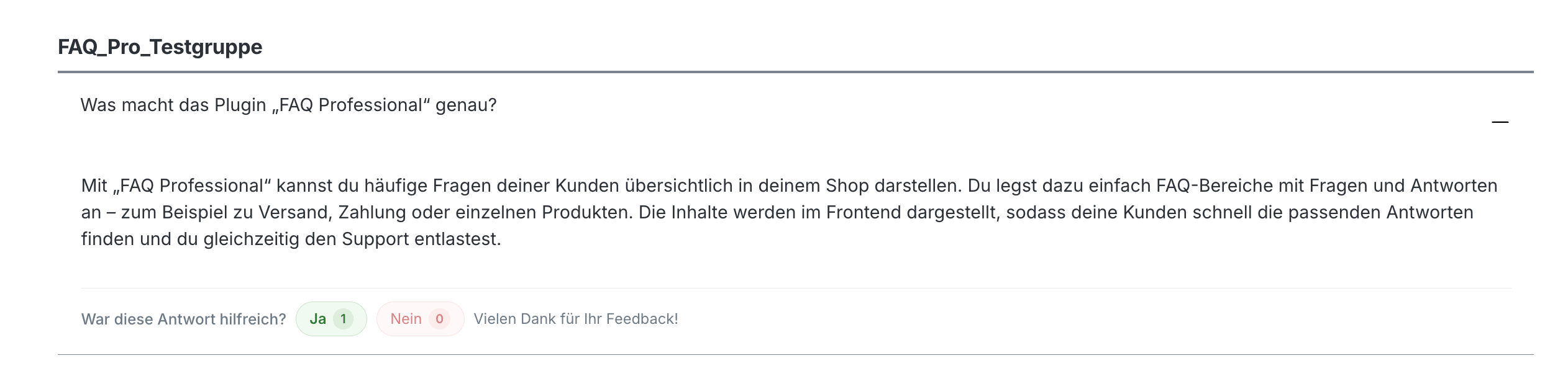
Below each answer, customers are asked whether it was helpful; a single click on Yes or No is all it takes. The analysis shows satisfaction per question and over time. In the question list and the group list, the value appears as a separate, colour-coded column.
What this looks like in practice
A shipping or returns process is changed, but the associated FAQ is not. In the following weeks, a question with a high number of views and declining satisfaction appears in the dashboard. That is the signal that the answer no longer reflects reality – and the entry can be revised before customers have to ask.
Designing and linking answers
You maintain answers in an editor that goes beyond simple formatting: images, videos from YouTube and Vimeo, quotes, notice boxes and tables. A slash opens a command menu that narrows down with each additional character. The question itself remains a simple text field – a question does not need formatting.
Every question can be linked individually, and the URL is readable: instead of a string of ID numbers, it contains the group name and a short form of the question. A copy icon next to the question copies the link to the clipboard – handy for sending a customer the one relevant answer by email. Links that have already been sent continue to work; each question also retains a permanent anchor.
Two standards, one goal: machine-readable for search engines and AI services
What happens in the storefront source code is invisible to your customers – but not to search engines and AI services. The plugin relies on two complementary standards for this.
schema.org FAQPage markup – the plugin marks up questions and answers on every page where they are visible: exactly once per page, limited to the questions shown there, validated.
llms.txt and llms-full.txt – at /llms.txt you will find a guide according to the llmstxt.org standard: one section per FAQ group, each question linked directly to its position on your FAQ page. At /llms-full.txt you will find the complete collection with all answers. While the schema.org markup applies per page, llms.txt provides a central overview of the entire content.
For context: Since May 2026, Google no longer displays FAQ rich results in search results. Nevertheless, the markup remains the basis for crawlers and AI-powered services to read your answers correctly.
Important: The plugin provides the prerequisites. Whether and how an FAQ answer actually appears in an AI response is decided by the respective providers according to their own criteria. What we can promise is the technical foundation – the part a shop has under its own control.
Multilingual support and accessibility
Questions and answers are maintained per language. If a translation is missing, the plugin can optionally display the default language instead of omitting the question. The backend list shows which translations are still missing for each language.
The FAQ accordion can be operated with the keyboard and a screen reader and meets levels A and AA of WCAG 2.2, as required by the German Accessibility Strengthening Act (BFSG) since June 2025. This statement refers to the accordion; whether your shop as a whole meets the requirements depends on the theme, content and other extensions.
At a glance
Feature | Benefit |
|---|---|
Assignment |
By tag to products, categories, variants, landing pages and shipping methods – or directly to categories and products |
All sales channels |
One toggle instead of individual selection, including for channels created later |
Display |
Product tab, category page without block, CMS block, FAQ element in a column, checkout |
Shop search |
Results in suggestions and on the results page, with Elasticsearch or OpenSearch if available |
Statistics dashboard |
Views, trends, most-read and never-opened questions, filters by channel and language |
Rating |
Yes/No below each answer, satisfaction as a column in both lists |
Editor |
Images, videos, quotes, notice boxes, tables, slash quick commands |
Link to the individual question |
Readable anchor and copy icon |
Machine-readable |
schema.org per page, llms.txt and llms-full.txt centrally |
Accessibility |
FAQ accordion compliant with WCAG 2.2, levels A and AA |
Requirements & update
FAQ Professional runs on Shopware 6.6 and 6.7 with PHP 8.2 to 8.5. An Elasticsearch or OpenSearch instance is used if it is reachable; without it, the search runs via the database.
Notes for existing customers
Updating to 6.7.6 or later with Elasticsearch: runbin/console es:indexonce so that the "All sales channels" toggle also takes effect in the shop search. Shops without Elasticsearch are not affected.
Shopware before 6.7.13: Version 6.7.7 fixes a bug that blocked saving in the Administration. If an update to 6.7.6 was aborted, the pending steps run automatically with 6.7.7.
Switching from the 1.x series: Instructions can be found in the documentation.
Who the plugin is for
For shops that want to maintain their questions and answers in one place and display them where the question arises – and that want to know whether the answers are getting through. For new customers, the plugin is ready to use after installation; all settings come with default values. Existing customers will find the update notes above.
Note: FAQ Professional is an in-house development by SYNERGY NETWORKS GmbH and is available in the official Shopware Store.
Further information:
- FAQ Professional in the Shopware Store – Current version, changelog and reviews
- FAQ Professional documentation – Setup, configuration and update notes
- Video tutorial on YouTube – Step-by-step setup
- Shopware 6 updates: All changes at a glance – Our changelog article on the platform foundation
Comments
No comments yet.
Write a comment